Making Tax Digital for Landlords: Your 7-Point Checklist Before HMRC Signs You Up 'Automatically'
England · 10 min read · 18 June 2026 · Last reviewed 29 August 2026

Digital Record Keeping Is Here Now!
Has Making Tax Digital already started, and have you missed it? If you're a landlord whose combined income from property and any self-employment is over £50,000 a year, the first answer is yes: it began on 6 April 2026. The second answer is no, you haven't missed it.
You can still sign up. Whichever wave you're in, your first quarterly update covers 6 April to 5 July and is due by 7 August that year, which gives a clear runway as long as you start now rather than the week before.
This guide is for individual landlords. If you hold your property through a limited company, MTD for Income Tax doesn't apply to you.
Make no mistake: this is one of the biggest changes to how landlords report to HMRC in a generation. It's a wholesale move to digital, quarterly reporting, on the scale of when VAT first arrived. It's mandatory, and it reaches every landlord over the threshold. This guide cuts HMRC's webinar and official guidance down to what actually matters, so you don't have to wade through them. And it doesn't have to cost you a thing: HMRC themselves "strongly encourage all software providers to produce a free version of their software".
By the end, you'll know whether MTD applies to you, what you have to do before your first 7 August deadline if you're in scope, and how to do it without paying for tools you don't need.
And there's a new development to factor in: from September 2026, HMRC automatically signs up landlords who should be using MTD and haven't done it themselves, using the records it already holds. It's still better to do it yourself, on your own current figures, and this checklist is what walks you through it.
The 7-point checklist at a glance:
- Work out your gross qualifying income (it's your rent, not your profit, so you don't deduct any expenses)
- Find your threshold and your deadline
- Sign up, if you meet the threshold
- Start capturing receipts digitally now
- Don't over-engineer your banking
- Choose your filing route (bridging software or accountant)
- Know your deadlines and the penalty regime
Each point is broken down below.
1. Work Out Your Gross Qualifying Income (It's Your Rent, Not Your Profit)
This is where most landlords get caught out. The figure HMRC measures isn't your profit. It's your gross income.
In HMRC's words: "HMRC will assess your gross income (income before you deduct expenses, also called your turnover)."
So if you collect £45,000 in rent but spend £20,000 on repairs, insurance, and agent fees, HMRC still counts the full £45,000, not the £25,000 you actually keep.
Your qualifying income is the total of:
- ✅ UK property income, your rent (a lodger's rent is property income too, unless it stays within the £7,500 Rent a Room allowance)
- ✅ Foreign property income
- ✅ Self-employment income
It does not include:
- ❌ Employment income (PAYE from a job)
- ❌ Dividends, including from your own company
- ❌ A share of partnership profit
- ❌ State Pension or private pensions
The qualifying sources of income are added together. HMRC's own example: £25,000 from rental income plus £27,000 from self-employment comes to £52,000 of qualifying income, which is over the £50,000 threshold.
What to do: Add up your gross rent across all your properties, plus any self-employment income. That combined total, before you take off a single expense, is the number HMRC checks against the threshold.
2. Find Your Threshold and Deadline: Are You in the First Wave?
The thresholds roll out in three waves. Your start date depends on which wave your qualifying income falls into.
HMRC checks this against a tax return you've already filed, not your current rent. It's the one from two tax years before each start date, because that's the last one in hand when MTD begins. So read the table by the year your income was in, not this year's figure.
| Your qualifying income | Based on your return for | You must use MTD from | First quarterly update due |
|---|---|---|---|
| Over £50,000 | 2024 to 2025 | 6 April 2026 (now) | 7 August 2026 |
| Over £30,000 | 2025 to 2026 | 6 April 2027 | 7 August 2027 |
| Over £20,000 | 2026 to 2027 | 6 April 2028 | 7 August 2028 |
If you're over £50,000, you're in the first wave, and it's already live. Your first quarterly update covers 6 April to 5 July, and that submission is due by 7 August. For the first wave that was 7 August 2026, and each later wave has its own 7 August the year it starts.
HMRC will write to you if your tax return shows you're over the threshold. But don't wait for a letter: "Even if you do not receive a letter, you must still check your qualifying income to find out if you need to use the service and sign up."
If you own jointly: each owner is assessed on their own share. A property earning £30,000 split 50/50 counts as £15,000 each, under the £20,000 threshold. That can take you out of MTD altogether (for now), because it's each owner's share that counts, not the property's total income.
Even so, it's worth keeping digital records anyway, capturing income and costs as they occur. The habit costs nothing, you'll be ready if the threshold ever drops, and the records still serve your Self Assessment property pages (the SA105) in the meantime.
If you're a non-resident landlord who files an SA109 with your tax return: you won't have to use MTD before April 2027, even if you're over the threshold.
What to do: Match your combined gross income to the bands above to find your start date and, from that, your first 7 August deadline.
3. Sign Up, If You Meet the Threshold
What if HMRC signs you up automatically?
Take-up was slow to build, and plenty who need to be in the system still hadn't signed up, so HMRC stopped waiting for them. From September 2026 it signs people up itself, using the information it already holds (your last Self Assessment return) to work out who's over the threshold and automatically enrol you.
You can still sign up yourself, and it's better if you do. Being signed up by HMRC isn't the same as being ready: it uses "only the information we already hold about you", which may not reflect anything that's changed since your last return. You could be enrolled on a property you no longer let, or without a source you've since added. So if you're over the threshold, sign up on your own terms, with your own current figures. And if HMRC has already signed you up, check the steps to take next.
Signing up yourself
Before you can sign up, two things need to be true:
- You're already registered for Self Assessment
- You've filed at least one tax return in the last two years
If that's you, and you're over the threshold, you can sign up through HMRC's online service now. The earlier you do it, the more time you have to get your records flowing before the first deadline.
And there's a reason not to panic about going early: HMRC is taking a light-touch approach in the first year. (Exactly what that means for penalties is in Section 7.)
What to do: If you're over £50,000, check you're registered for Self Assessment and have filed a return in the last two years, then sign up through HMRC's online service. If you're below the threshold, you don't need to do anything yet, but it's worth knowing your gross income.
4. Start Capturing Receipts Digitally Now
MTD isn't only about filing quarterly. At its core it's a record-keeping rule: you have to keep digital records of your income and expenses and file them through compatible software. HMRC's stated aim is for landlords to "fulfil their income tax obligations entirely through compatible software".
And the digital records aren't the whole story: you still have to keep the original receipts and supporting documents (or copies) behind your figures, just as you would for Self Assessment, in case HMRC ever asks to see them.
This doesn't mean becoming an accountant. It means having somewhere to capture what comes in and what goes out, as it happens.
For each property, you'll record:
- Rental income received
- Allowable expenses (repairs, insurance, agent fees, and so on)
- The date and category of each transaction
A couple of things worth knowing as you set up:
Most landlords use the cash basis. It's the default method for landlords, and it simply means you record income and expenses when the money actually moves, when rent lands or a bill is paid, rather than when it was invoiced.
Mortgage interest works differently. Section 24 is the rule that stopped personal property landlords deducting mortgage interest from their rental income the way they once could. Instead of lowering your taxable profit, your residential mortgage interest now gives you a flat 20% tax credit, which HMRC applies when it works out your tax at the end of the financial year.
So you record it in its own category, and it's still included in each quarterly update, just pro-rata for the period. UBiQS lets you spread a recurring cost like this across the months of the year, so it shows up in each update rather than as one year-end lump.
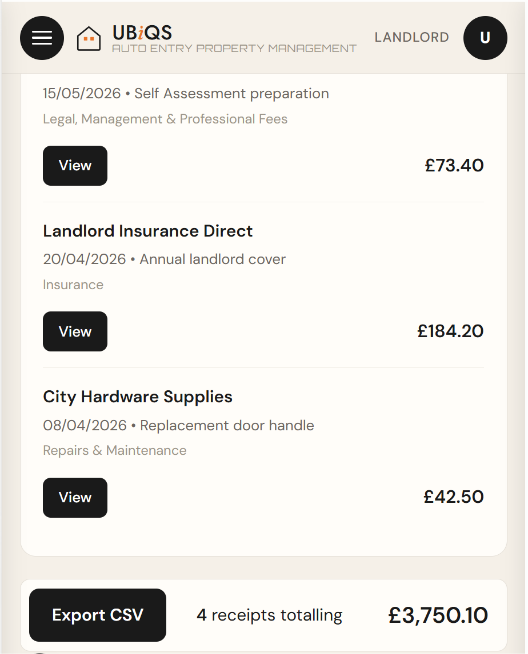
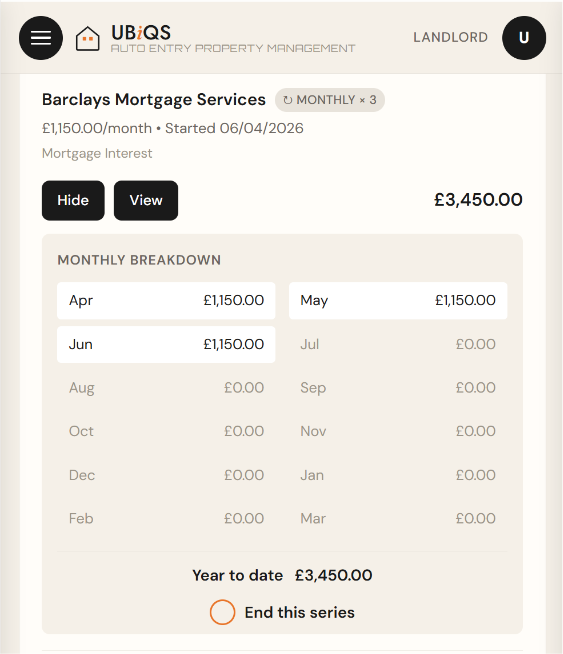
Receipts captured and sorted into HMRC categories, with mortgage interest broken down month by month.
The real shift is the habit. Quarterly reporting means the old January scramble through a shoebox of receipts won't work, you'd just be doing it four times a year. The fix is real-time recording: capture each receipt at the point you get it, photograph, upload, categorise, done.
This is exactly what the free UBiQS expenses tool is built to do. Snap a receipt and it reads the supplier, date and amount, then sorts it into the right HMRC category, for you to check and retain for your digital record keeping.
What to do: Pick one place to capture every receipt and rent payment, and start now, not the week before 7 August. Keep your mortgage interest in its own category.
5. Don't Over-Engineer Your Banking
You'll read advice everywhere telling you to open a separate bank account for your rental income. The idea is that it makes tracking easier. It's a common question, and it came up at HMRC's own MTD webinar, so it's clearly on landlords' minds.
But for a personal landlord, it's usually overkill. To do it "properly" you'd also want to separate capital costs (a new boiler, a kitchen) from running costs (repairs, insurance), which means more than one account per property. Three flats could mean six extra accounts to manage. That's a lot of admin for no real gain.
And it only takes one trip to B&Q, paying with whatever card is in your pocket, for that separation to break down.
Here's the thing: MTD doesn't require a separate bank account. The organising happens at the point you capture the receipt, not the point you pay. Snap it, categorise it, and it doesn't matter which account the money came from. The separate-account advice is really for large portfolio landlords, or a workaround for people without a proper way to record digitally.
What to do: Don't open accounts you don't need. Keep using the ones you have, and capture and categorise each receipt as it happens, whatever card or account it came from.
6. Choose Your Filing Route (Bridging Software or Accountant)
Keeping good digital records is one job. Getting them to HMRC is another. The quarterly update has to go through MTD-compatible software, and you've got two sensible routes.
Route 1: file it yourself with bridging software. Bridging software takes the totals from your records and sends them to HMRC for you. You don't have to run your whole property business through accounting software, you just need something that can make the submission. Taxd is one example, an HMRC-listed bridging tool that supports UK property. (That Taxd link is a UBiQS referral link, and UBiQS earns a small credit if you sign up through it, at no extra cost to you.) Not sure which bridging tool fits? HMRC's software finder asks how you'll use it and shows your options.
Route 2: let your accountant file. If you already use an accountant for your Self Assessment, they can make your quarterly updates and final declaration for you, as your agent. You'll still need to keep your records digitally through the year, that part stays yours, but you can hand them your captured records straight from UBiQS as a clean CSV.
If you own jointly, there's a shortcut worth knowing. For a jointly owned property you can report just your share of the income in each quarterly update and leave the expenses out until year-end, then add your share of the expenses by resending your fourth quarterly update before your final declaration. It's an HMRC easement to cut the quarterly admin for joint owners.
Either way, there's one HMRC rule worth understanding: the digital link. HMRC wants an unbroken digital chain from your records to your submission, with no manual retyping in between. Whether your records sit in a spreadsheet you save as a CSV, or in a tool that produces the file for you, the principle is the same: the file moves digitally, you don't retype the numbers. Copying figures across by hand breaks the chain.
This is where UBiQS fits, and it's the half MTD makes compulsory. MTD is really two jobs: keep digital records, and submit them. UBiQS does the first: it keeps your income and expenses as proper digital records and produces a clean, HMRC-categorised export, ready to file. The final submission goes through a bridging tool like Taxd (the HMRC-listed bridging tool above) or your accountant, fed straight from your UBiQS export. Together that's your whole MTD setup: UBiQS holds the records, the bridging tool sends them.
UBiQS holds your records safely (your digital shoebox) for as long as HMRC requires you to keep them, at least five years after each 31 January filing deadline, ready to call on if a query ever lands. Think of it as the organised middle layer between your pile of receipts and whoever makes the submission.
What to do: Decide your route now, before the deadline, not during it. Whichever you choose, keep the digital link unbroken: let the software move your figures, don't retype them by hand.
7. Your Deadlines and the £200 Penalty
Under MTD you submit four quarterly updates a year, then one final declaration. Each quarterly update is cumulative: it covers everything from 6 April to the end of that quarter, not just the latest three months, so you can correct earlier figures without resubmitting.
The standard deadlines:
| Quarterly update covers | Deadline |
|---|---|
| 6 April to 5 July | 7 August |
| 6 April to 5 October | 7 November |
| 6 April to 5 January | 7 February |
| 6 April to 5 April | 7 May |
Then, by 31 January after the tax year ends, you submit your final declaration. This replaces the old Self Assessment return, and it's where you confirm your figures and claim any reliefs. (If you've heard of an "End of Period Statement", that step has been removed, there's just the final declaration now.)
The penalties, in plain terms:
Late updates use a points system. You get one point each time you miss a quarterly deadline. At four points you get a £200 penalty, and another £200 for each miss after that. Points clear after 24 months of filing on time.
Late payment of the tax you owe is charged separately, and it escalates the longer you leave it. For 2026 to 2027:
- Pay within 15 days: no penalty
- 16 to 30 days late: 3% of what's owed (and in this first year, even this can be waived)
- 31 days or more: 3%, plus another 3%, plus 10% a year until it's paid
Some Good News! "There are no penalties for missing a quarterly update deadline for the 2026 to 2027 tax year." That's the whole quarterly-update penalty regime paused for the first year, not just the points. So 2026 to 2027 is a genuine settling-in period, a reason to start now without panic, not a reason to drift. You still have to submit the updates, and they still come before your final declaration.
What to do: Put the four quarterly dates (7 August, 7 November, 7 February, 7 May) and the 31 January final declaration in your calendar today. While the stakes are low, and even if you don't meet the threshold yet, start real-time recording now. You might even find it satisfying. And because your records are already in order in UBiQS, each of those dates is a quick export, not a scramble.
You've Got This! And the time to Start is Now!
Making Tax Digital sounds bigger than it is. Strip away the noise and it comes down to a few habits: know your gross income, sign up if you're in scope, record as you go, and file four times a year and finalise once.
The landlords who'll find this stressful are the ones who leave it to the week before a deadline. The ones who'll barely notice are the ones who got their records flowing early. That's the whole difference, and you've still got time to get organised, starting from the shoebox you've got today.
While you're getting your tax admin in order, it's a good time to check your other landlord deadlines too, like your gas safety certificate and tenancy deposit protection.
Quick recap:
- Work out your gross qualifying income
- Find your threshold and deadline
- Sign up, if you meet the threshold
- Start capturing receipts digitally now
- Don't over-engineer your banking
- Choose your filing route
- Diarise your deadlines
The one habit to start today: capture your records in real time. Even if you're not over the threshold yet, it's what makes all of this easy.
That's what the free UBiQS expenses tool is for: free for one property, no card required. When a deadline comes, you export a clean, accountant-ready CSV, with your gross income added at the point of export.
Start uploading for free in Expenses. It takes a couple of minutes, and it's the calmest way into MTD.
UBiQS, tackling the tsunami of change for personal property landlords.
Still have questions? If your situation is less standard, a partnership, the Construction Industry Scheme, or fixing an error in a past update, HMRC's Making Tax Digital FAQs cover the common ones.
Sources
All figures and rules in this guide are taken from official HMRC and gov.uk sources:
- Work out your qualifying income for MTD for Income Tax
- Find out if and when you need to use MTD for Income Tax
- Rent a Room Scheme (HS223): lodger income and the £7,500 allowance
- Sign up for MTD for Income Tax
- Check what to do if HMRC has signed you up for MTD (gov.uk, 24 Aug 2026)
- HMRC begins automatic sign-up for remaining landlords, September 2026 (HMRC news, 12 Aug 2026)
- Send quarterly updates (deadlines and cumulative reporting)
- HMRC MTD end-to-end service guide (free software, digital records, final declaration)
- Create digital records and keep original receipts/supporting documents
- Keep digital records (the digital link rule)
- How long to keep your records (5 years after 31 January)
- Penalties for MTD for Income Tax
- Changes to tax relief for residential landlords (Section 24)
- Cash basis for landlords (PIM1092)
- Find MTD-compatible software
- Making Tax Digital FAQs (HMRC campaign)